



BirdDog Control Surface with MAKI Studio
BirdDog Control Surface is a hardware switcher that pairs with the free MAKI Studio iPad app for computer-free multi-camera switching, titling and streaming. From Prosales, South Africa.
SKU: BDMK-CS
1-Year Warranty · Authorised SA Distributor · Nationwide Shipping
AvailabilityAvailable on backorder
This item is on backorder. Place your order now and we will confirm the lead time with you.
ShippingNationwide courier
We deliver across South Africa with reliable courier partners. Shipping is calculated at checkout.
Bulk & trade ordersGet a quote
Buying in volume? Contact us for trade and bulk pricing.
Finance optionsStitch · Payflex · Float


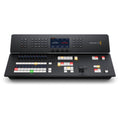
The BirdDog Control Surface with MAKI Studio is the hands-on heart of a computer-free live production. It pairs with the free MAKI Studio iPad app to run multi-camera switching, graphics, audio and streaming, and is the natural starting point for a BirdDog MAKI production system.
Please note: an iPad is not included. The Control Surface runs the free MAKI Studio app on your own iPad (iOS 16.6 or later), which you supply separately.
Key Features
- Hands-on switching: 6 Program and 6 Preview source buttons.
- Transitions: T-Bar plus Cut, Auto and PIP transition keys.
- Graphics: Stinger, Title, Network Title and Bug Logo overlay buttons.
- Audio: Audio Preset with four recall banks.
- Links to iPad: Bluetooth-LE, with USB-C power in and out.
- Free software: MAKI Studio app for iPad (not included), up to 10 live inputs.
- Multi-destination streaming: Facebook Live and RTMP to up to three destinations.
Compatible With
Optimised for BirdDog Maki Live, and compatible with any NDI camera including the BirdDog X-series.
Specifications
- Type: hardware control surface for MAKI Studio
- iPad: not included, required to run MAKI Studio (supply your own, iOS 16.6 or later)
- Source select: 6 Program and 6 Preview buttons
- Transitions: T-Bar, Cut, Auto, PIP transition
- Overlays: Stinger, Title, Network Title, Bug Logo
- Audio: Audio Preset with 4 recall banks
- Connectivity: Bluetooth-LE, USB-C in and out
- Software: free MAKI Studio app, iPad, iOS 16.6 or later
- App inputs: up to 10 live inputs (NDI HX, high-bandwidth NDI, UVC)
- Streaming: Facebook Live and RTMP, up to 3 destinations
Available from Prosales, South Africa.
| Type | Hardware control surface for MAKI Studio |
| iPad | Not included, required to run MAKI Studio (supply your own, iOS 16.6 or later) |
| Source select | 6 Program and 6 Preview buttons |
| Transitions | T-Bar, Cut, Auto, PIP transition |
| Overlays | Stinger, Title, Network Title, Bug Logo |
| Audio | Audio Preset with 4 recall banks |
| Navigation | Vertical scroll wheel |
| Connectivity | Bluetooth-LE to iPad, USB-C in and out |
| Software | Free MAKI Studio app, iPad, iOS 16.6 or later |
| App inputs | Up to 10 live inputs (NDI HX, high-bandwidth NDI, UVC) |
| Streaming | Facebook Live and RTMP, up to 3 destinations |
Computer-Free Live Switching
A hands-on control surface that pairs with the free MAKI Studio iPad app to switch, title, mix audio and stream a multi-camera production without a computer.
Everything Under Your Hands
Six Program and six Preview buttons, a T-Bar, transition and overlay keys and a four-bank audio preset put a full switcher under your fingers, linked to the iPad over Bluetooth.
Open to Any NDI Camera
MAKI Studio takes up to ten inputs from NDI HX, high-bandwidth NDI and UVC sources, optimised for Maki Live and compatible with any NDI camera including the BirdDog X-series.
